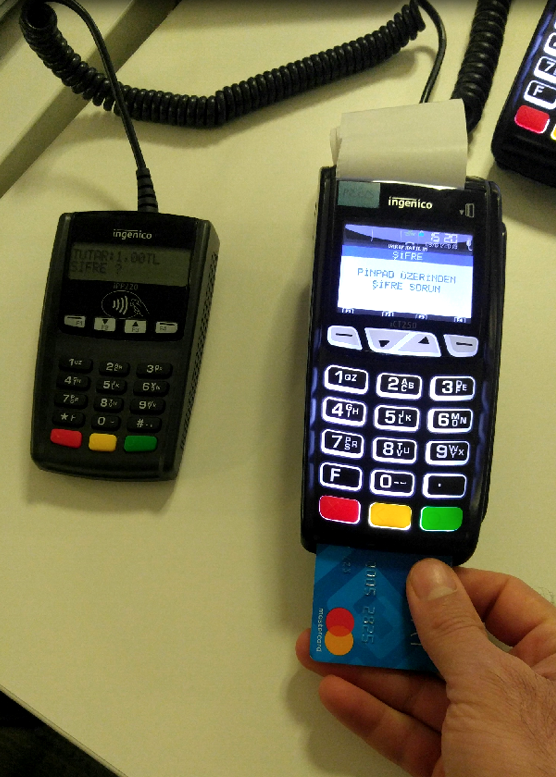
PIN pads are security-hardened devices that make it easy for users to enter their card PIN during credit or debit card transactions on a POS, and that, for contactless transactions, let a card be tapped on the PIN pad so its data can be transferred to the POS.
Encrypted PIN pads (EPP) are used in many places where financial transactions take place (ATMs, POS terminals, etc.).
How is security ensured between the PIN pad and the POS?
Both the PIN pad and the POS device must be certified under PCI standards, and the PCI certificate versions of the PIN pad and the POS must be compatible with each other.
Can information sent from the PIN pad be intercepted?
No, it cannot. Both the PIN pad and the POS device are secured and certified in accordance with PCI standards. A PIN pad without a PCI certificate cannot process transactions at all.
The PIN entry process on a PIN pad
- The transaction amount is entered on the POS, or the transaction is started by tapping/reading the card.
- Entering the transaction amount or reading the card activates the PIN pad.
- A message showing the transaction amount and prompting for the PIN is displayed.
- The PIN is entered on the PIN pad.
- The entered PIN is encrypted. (The PIN is instantly converted into encrypted ciphertext.)
- The encrypted PIN data is transmitted to the POS.
- The POS decrypts the PIN received from the PIN pad.
- The POS compares the PIN entered on the PIN pad with the PIN stored in the card's chip data through offline PIN verification. (Offline PIN verification is not always used. If the POS instead performs online PIN verification, the entered PIN is sent to the card's issuing bank, and the POS waits for the issuer's PIN verification result.)
- Once the PIN is verified offline, the transaction is forwarded to the card issuer and the POS's acquiring bank, where it is approved or declined.
How does the PIN pad work as a contactless reader?
The PIN pad also functions as a contactless reader. In summary, the contactless reading process works as follows:
- The transaction is started by entering the amount on the POS.
- Entering the amount on the POS activates the PIN pad.
- The PIN pad displays the message 'You may make a contactless payment.'
- The card is tapped on the PIN pad.
- The PIN pad reads the data stored in the card's chip and transmits it to the POS in encrypted form.
- The POS decrypts the data sent from the PIN pad. (Someone with access to the POS's software can never obtain this data.)
- Based on the data received, the POS decides whether the transaction with the card will be processed offline.
- If the transaction is processed offline, POS and card checks are performed and the transaction is approved or declined.
- If the transaction is processed online, the POS sends it to the POS's acquiring bank and the card issuer, who return an approval or decline.
How can I tell that the PIN pad is connected to the POS?
If the light in the top-left corner of the PIN pad, which blinks intermittently, is green, the PIN pad is successfully connected. If there is no connection between the PIN pad and the POS, or if there is a problem, the green light does not come on.
How is the PIN pad connected to the POS?
The PIN pad is connected to the POS via a USB port.