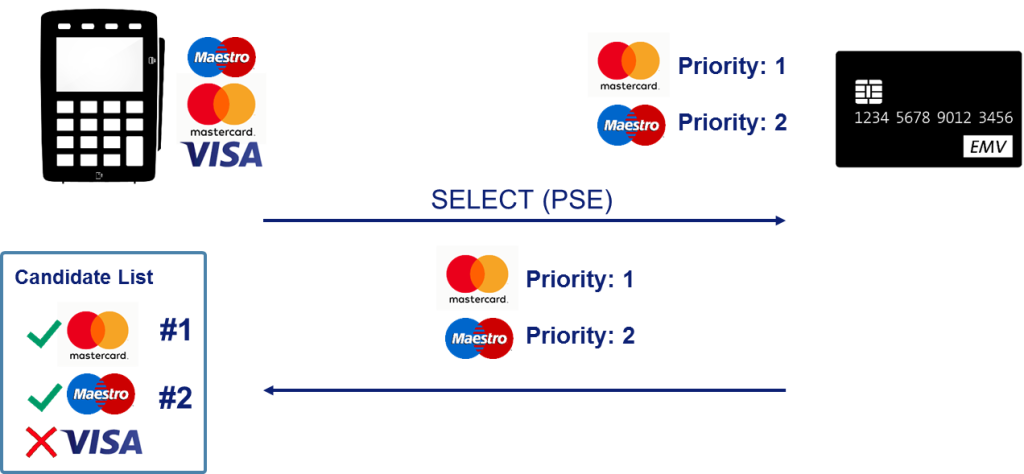
PSE (Payment System Environment) is a directory on the card named «1PAY.SYS.DDF01», the indicator for a contact chip, and «2PAY.SYS.DDF01», the indicator for a contactless chip. The Candidate List built using PSE is called «Indirect» or «Implicit» Application Selection. The terminal sends the APDU request (i.e., the SELECT command) to the card using this name.
For example:
- Select (1PAY.SYS.DDF01)
- Cla: 00
- Ins: A4
- P1: 04
- P2: 00
- Lc: 0E
- Data: 315041592E5359532E4444463031
- Application: 1PAY.SYS.DDF01
- Le: 00
If the directory is present on the card, the card will return SW1/SW2 = 9000 (OK) and will also send parameters for further exchange.
If the directory is missing on the card, APDU-R will have SW1/SW2 = 6A82 (File not found). In most cases, «1PAY.SYS.DDF01» is missing on contact chip cards. However, «2PAY.SYS.DDF01» is always present on a contactless chip, so the selection of applications using the contactless interface is always carried out via PSE.
The difference between PSE and direct AID selection
The PSE method uses the application directory that the card itself offers; the terminal does not have to try every AID one by one. In direct selection, on the other hand, the terminal asks the card for the AID list in sequence.
On contactless cards, the same logic is used under the name PPSE, which lists contactless payment applications. The PPSE response lets the terminal quickly determine which application to run.
The selection method affects transaction time and compatibility.