Cardholder verification in EMV is a situation specific to chip cards. One of the goals of EMV is to minimize card fraud.
To achieve this, three parties must be verified:
- The bank
- The cardholder
- The terminal
One of the pieces of data read from the card to prove the cardholder's identity is the Cardholder Verification Method (CVM) list. This ordered list contains one or more methods for verifying the cardholder.
Cardholder Verification Method (CVM) list
The CVM list, comes from the card in tag 0x8E in the response to the read data request:
| Field name | Field Description | Field length | Type |
| X | Amount, in the application's currency, used in the cardholder verification rules | 4 byte | Binary |
| Y | Amount, in the application's currency, used in the cardholder verification rules | 4 byte | Binary |
| CVRule1..CVRuleZ | One or more cardholder verification rules, each 2 bytes long. | 2 * Z byte | Binary |
The following logic is applied to process the list:
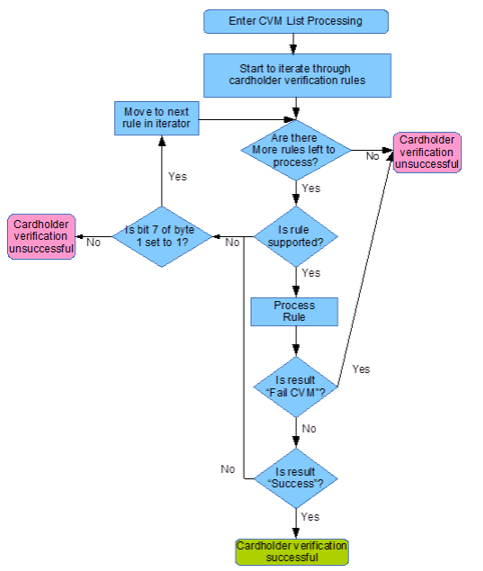
Processing the cardholder verification rule
The most important part of the process is actually the processing of the cardholder verification rules.
A cardholder verification rule consists of two bytes.
byte 1 = CVM code; byte 2 = expresses the conditions under which the CVM code in byte 1 can be applied.
| Byte | Bits | Value | Meaning |
| 1(CVM Code) | 1-6 | 0 | Fail CVM processing. |
| 1(CVM Code) | 1-6 | 1 | Offline plaintext PIN. |
| 1(CVM Code) | 1-6 | 2 | Online PIN (always enciphered). |
| 1(CVM Code) | 1-6 | 3 | Offline plaintext PIN and paper based Signature. |
| 1(CVM Code) | 1-6 | 4 | Offline enciphered PIN. |
| 1(CVM Code) | 1-6 | 5 | Offline enciphered PIN and paper based Signature. |
| 1(CVM Code) | 1-6 | 30 | Paper based Signature only. |
| 1(CVM Code) | 1-6 | 31 | Approve CVM processing. |
| 1(CVM Code) | 1-6 | * | Reserved. |
| 1(CVM Code) | 7 | 0 | Fail cardholder verification if verification is unsuccessful. |
| 1(CVM Code) | 7 | 1 | Move to next rule if verification is unsuccessful. |
| 1(CVM Code) | 8 | 3 | Reserved for future use. |
| 2 (CVM Condition Code) | * | 0x00 | Always try to apply this rule. |
| 2 (CVM Condition Code) | * | 0x01 | Only try to apply this rule where this is an unattended cash transaction. |
| 2 (CVM Condition Code) | * | 0x02 | If not unattended cash and not manual cash and not purchase with cashback |
| 2 (CVM Condition Code) | * | 0x03 | Always try to apply this rule where the CVM code is supported. |
| 2 (CVM Condition Code) | * | 0x04 | If this is a manual cash transaction apply this rule. |
| 2 (CVM Condition Code) | * | 0x05 | If this is a purchase with cashback apply this rule. |
| 2 (CVM Condition Code) | * | 0x06 | If transaction is in the application currency and is under X value (see the description of the CVM List for definition of X) then apply this rule. |
| 2 (CVM Condition Code) | * | 0x07 | If transaction is in the application currency and is over X value (see the description of the CVM List for definition of X) then apply this rule. |
| 2 (CVM Condition Code) | * | 0x08 | If transaction is in the application currency and is under Y value (see the description of the CVM List for definition of Y) then apply this rule. |
| 2 (CVM Condition Code) | * | 0x09 | If transaction is in the application currency and is over Y value (see the description of the CVM List for definition of Y) then apply this rule. |
| 2 (CVM Condition Code) | * | * | Reserved. |
Processing a CVM code
A CVM code that is mutually supported is applied once it has been established and is valid under its relevant rules. A combination of the following items may apply.
- Failed.
- Successful.
- Online PIN verification.
- Offline PIN verification.
- Signature verification.
Offline PIN is the most complex verification method, since the entered PIN must be verified by the chip.
Online PIN means that, the moment the PIN is successfully captured, it is sent online for verification. (together with ARQC, in the first object of the application cryptogram)
Signature verification is simpler than both online and offline verification. If the terminal has the capability to process a signature, the transaction is considered successful.
You can find more detailed information in the EMV 4.3 Book 3 document at the link below.