The Application Interchange Profile indicates the application functions supported by the card.
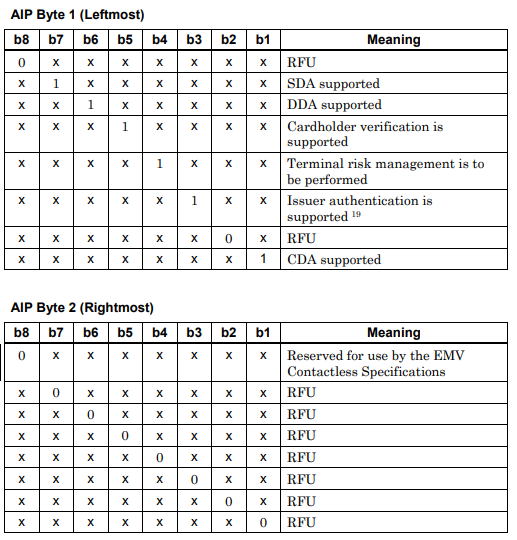
The AIP values and their descriptions are given below:
Where is the AIP found?
The AIP is a 2-byte piece of data stored on the card and is carried under EMV tag 82. The card sends this information to the terminal together with its response to the GET PROCESSING OPTIONS (GPO) command sent by the terminal.
How does the terminal use the AIP?
The AIP tells the terminal which processes it needs to carry out in the later steps of the transaction. By looking at the bits in the AIP, the terminal makes the following decisions:
- Which offline data authentication method (SDA, DDA, CDA) the card supports
- Whether cardholder verification (PIN, signature, etc.) is supported
- Whether terminal risk management will be performed
- Whether issuer authentication is supported
Why is it important?
The AIP forms the basis of compatibility between the card and the terminal. For example, if a card only supports DDA, the terminal will not attempt to authenticate it with SDA. In this way, the terminal applies the most appropriate security checks for each card.
AIP in the authorization message
The AIP is also sent to the issuing bank in the authorization message along with the chip data. When the bank verifies the cryptogram coming from the card, it also includes the AIP value in the calculation. This ensures that it is verified that the AIP was not altered between the terminal and the card.