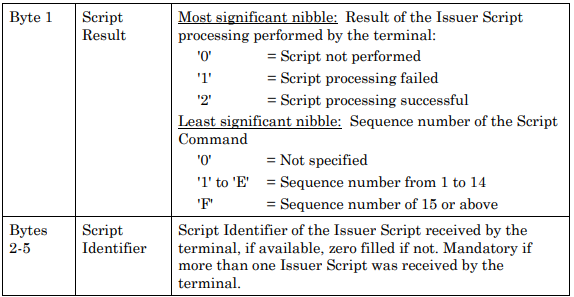
This is the field where the results of the Issuer Script commands sent to the card are displayed.
The Issuer Script Result fields, the values they can take, and the explanations of those values are below:
BYTE 1
Bits 8-5: Results of the executed Issuer Script processing
- 0: Issuer Script processing was not performed
- 1: Issuer Script processing failed
- 2: Issuer Script processing succeeded
Bits 4-1: Results of the executed Issuer Script processing
- 0: Not defined
- 1-14: Sequence of the command
What is an issuer script?
An issuer script is a set of commands that the card-issuing bank sends to the card together with the authorization response. Thanks to these commands, the bank can update the information on the chip while the card is in the customer's hands. For example, the following operations can be performed with an issuer script:
- Resetting the PIN try counter or changing the PIN
- Blocking the application on the card or the card itself
- Updating the limits and parameters on the card
Why are the results important?
When the bank sends a command, it needs to know whether the command ran successfully on the card. After passing the commands to the card, the terminal collects the results in the Issuer Script Results field. This field is delivered to the bank in the transaction's clearing record or in a later message. In EMV, it is carried with tag 9F5B.
If the command fails
If the command fails, the update on the card is not made. For example, a card that was meant to be blocked may continue to be used if the command fails. For this reason, the bank monitors failed results and, where necessary, resends the command in the next transaction. Byte 5 of the TVR also contains bits indicating that issuer script processing failed.