We covered the background information on ISO 8583 in the link below.

You will find the ISO 8583 message structure and the details of these structures in this article.
ISO 8583 Message Structure
An ISO 8583 message consists of 3 main parts:
- MTI (Message Type Indicator)
- Bitmap (the field indicating which data elements are present in the message)
- Data Element (the message content fields)
Application Data
| Field # | Description |
| 0 | MTI Message Type Indicator |
| 1 – Bitmap | 64 (or 128) bits indicating the presence/absence of the other fields |
| 2 – 128 | The other fields indicated in the bitmap |
We can briefly visualize the data flow as follows:

Now let's examine the details of these fields:
Message Type Indicator (MTI):
It is a 4-digit numeric field that indicates the high-level function of the message.
ISO Version – Message Class – Message Function – Message Origin
First Digit: indicates the version of the ISO message;
| 0xxx | ISO 8583: 1987 version |
| 1xxx | ISO 8583: 1993 version |
| 2xxx | ISO 8583: 2003 version |
| 3xxx | Reserved for ISO use |
| 4xxx | Reserved for ISO use |
| 5xxx | Reserved for ISO use |
| 6xxx | Reserved for ISO use |
| 7xxx | Reserved for ISO use |
| 8xxx | Reserved for national use |
| 9xxx | Reserved for private use |
Second Digit: indicates the message class.
| Message Class | Description |
| x1xx | Authorization Message |
| x2xx | Financial message |
| x3xx | File Actions Message |
| x4xx | Reversal and Chargeback Message |
| x5xx | Reconciliation Message |
| x6xx | Administrative Message |
| x7xx | Fee Collection Message |
| x8xx | Network Message |
| x9xx | Reserved for ISO use |
Third Digit: indicates the message function.
| Message Subclass | Description |
| XX00 | Request message |
| xx10 | Response Message |
| xx20 | Advice Message |
| xx30 | Advice Response Message |
| xx40 | Notification Message |
| xx50 – xx90 | Reserved for ISO use |
Fourth Digit: indicates the direction of the message.
Incrementing the fourth digit by one indicates a repeat request (except for x300 messages). For example: 1100 = Authorization Request; 1101 Authorization Request Repeat.
| Message Originator | Description |
| 0 | Acquirer |
| 1 | Acquirer Repeat |
| 2 | Issuer |
| 3 | Issuer Repeat |
| 4 | Other |
| 5 | Other Repeat |
| 6 – 9 | Reserved for ISO use |
Therefore, by knowing the MTI value we can determine the type of the message. For example, if the MTI value is 1200,
- The first digit is for the Version Number, and the value in the MTI is 1, so the message version is based on ISO 8583: 1993.
- The second digit is for the Message Class, and the value in the MTI is 2, so the message is a financial message.
- The third digit is for the message subclass / function, and the MTI value is 0, so this message is a request message.
- The fourth digit is for the Message Originator, and the MTI value is 0, so the message comes from the Acquirer.
- Putting all of this together, this message with an MTI value of 1200 is an ISO 1993 Financial Request Message sent by the Acquirer.
To summarize the above, the commonly used MTI values and their descriptions are as follows:
| Description | |
| x100 | Authorization Request |
| x101 | Authorization Request Repeat |
| x102 | Authorization completion confirmation |
| x103 | Authorization completion confirmation repeat |
| x110 | Authorization Response |
| x112 | Authorization completion response |
| x120 | Authorization Advice |
| x121 | Authorization advice repeat |
| x122 | Authorization advice completion confirmation |
| x123 | Authorization advice completion confirmation Report |
| x130 | Authorization Advice Response |
| x132 | Authorization advice completion response |
| x200 | Financial Request |
| x210 | Financial Response |
| x220 | Financial Advice |
| x230 | Financial Advice Response |
| x300 | Acquirer File Update Request |
| x302 | Issuer File Update Request |
| x310 | Acquirer File Update Response |
| x312 | Issuer File Update Response |
| x320 | Acquirer File Update Advice |
| x322 | Issuer File Update Advice |
| x330 | Acquirer File Update Advice Response |
| x332 | Issuer File Update Advice Response |
| x400 | Acquirer Reversal Request |
| x402 | Issuer Reversal Request |
| x410 | Acquirer Reversal Request Response |
| x412 | Issuer Reversal Request Response |
| x420 | Acquirer Reversal Advice |
| x422 | Issuer Reversal Advice |
| x430 | Acquirer Reversal Advice Response |
| x432 | Issuer Reversal Advice Response |
| x5xx | Reconciliation Request Messages |
| x6xx | Administrative Request Messages |
| x800 | Network Management Request |
| x810 | Network Management Request Response |
Bitmap
A bitmap is an indexing technique used in an ISO 8583 message to indicate which Data Elements are present in the message.
The presence of a data element in a given message is indicated by a one (1) in its assigned position; a zero (0) in the assigned position indicates that a data element is absent. Every application transaction contains one (1) bitmap. A bitmap consists of 64 bits, numbered from the left starting with bit 1. The first bit of the bitmap is a secondary bitmap indicator. If a given ISO message does not support secondary bitmap processing, the first bit of the bitmap is '0'.
| Bit 1 | Bit 2 | Bit 3 | Bit 4 | … | Bit 64 |
| Field 1 '1' if a secondary bitmap is present, otherwise '0' | Field 2 Card Number | Field 3 Processing Code | Field 4 Amount, Transaction | Field 64 Message Authentication Code |
A message contains at least one bitmap, called the Primary Bitmap, which indicates the presence of Data Elements 1 through 64.
Secondary Bitmap may be present in Data Element 1, and therefore the first bit of the Primary Bitmap indicates whether a secondary bitmap is present
According to the latest version of the ISO 8583 standard, a message can contain at most three bitmaps. A bitmap can be transmitted as 8 bytes (binary), or sometimes as 8 bytes represented, unexpanded, by 16 hexadecimal characters (1-9, A-F (ASCII)).
Data Elements
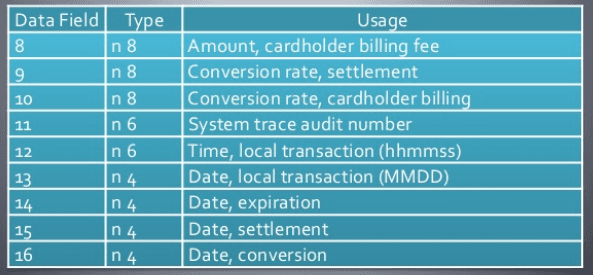
Data Elements are the fields that carry the transaction's information. While the original ISO 8583 (1987) standard supports up to 128 data elements, later versions can support up to 192 data elements. Each Data Element has a specific meaning and format.
For example: bit value 2 is used for the Primary Account Number; 3 for the Processing Code; and 4 for the Transaction Amount.
For each data element, ISO specifies the data format and size. ISO also specifies whether each data element is mandatory or optional for a given message.
Data Element Format
ISO-8583 essentially specifies different field types that fall into the following categories:
Fixed Length
• Numeric
• Alphanumeric
• Binary
Variable length
Max-length 99
• Numeric
• Alphanumeric
• Binary
Max-length 999
• Numeric
• Alphanumeric
• Binary
Nested message
Field Type Characteristics
| Abbreviation | Meaning |
| a | Alphabetic, including spaces |
| n | Numeric values only |
| s | Special characters only |
| an | Alphanumeric |
| as | Alphabetic and special characters only |
| ns | Numeric and special characters only |
| ans | Alphabetic, numeric, and special characters |
| b | Binary |
| z | Track 2 and Track 3 code sets as defined in ISO 7811 and ISO 7813 |
| h | Hex data |
| LL, LLL | The length of the following variable field. 'LL' – two-digit length indicator (1 byte BCD); 'LLL' – three-digit length indicator (2 bytes BCD) |
| ..17..125 | A variable field up to 17 characters. '..' is a two-digit length indicator (1 byte BCD) that specifies the number of digits defining the length of the variable data that follows. For a variable field up to 125 characters, '…' is a three-digit length indicator (2 bytes BCD) that specifies the number of digits defining the length of the variable data that follows. |
A data element can be of fixed or variable length.
In a message, the length indicator is shown before the variable-length field.
Fixed-Length Data Element
Fixed-length Data Elements have a length defined in the ISO 8583 standard, and no length indicator is needed in the message. These are specified together with their length, after the type of content allowed.
For example, Data Element 3 has the format 'n6', which means a 6-digit, fixed-length numeric field.
Variable-Length Data Element
Data elements other than fixed-length ones can have a variable length, and a length indicator is added before the data element in the message. The length indicator itself has a defined length.
For example, a 1-digit length indicator is sufficient for a variable-length field with a length between 1 and 9, while a 3-digit length indicator can support field values of up to 999.
Variable-length fields are denoted with two dots '..', followed by the maximum length of the field. The length indicator is represented by a series of 'L' characters corresponding to the length of the length indicator itself.
For example, Data Element 2 is the numeric n..19, LLVAR, which means a field with up to 19 numeric digits, together with a 2-digit length indicator.
There is a prefix that indicates the length of variable-length fields, but the ISO standards do not define how it should be represented. As a result, different vendors use different representations (for example, BCD, EBCDIC, or binary value).
Sample Message Breakdowns
Example 1: 0800 Message
| # | Name | Value | Hex Value |
| 0 | MTI | 0800 | 08 00 |
| 1 | PRIMARY BITMAP | Indicates the presence of fields 3, 11, and 41. | 20 20 00 00 00 80 00 00 |
| 3 | PROCESSING CODE | 000000 | 00 00 00 |
| 11 | STAN (System Trace Audit Number) | 000001 | 00 00 01 |
| 41 | CARD ACCEPTOR TERMINAL IDENTIFICATION | 29110001 | 32 39 31 31 30 30 30 31 |
Here is the binary representation of our 0800 message:
080020200000008000000000000000013239313130303031
In the example above, 0800 is the message type indicator; the first digit indicates the version number:
• 0 version 1987
The second digit is the message class:
• 8 network management
The third digit is the message subclass / function:
• 0 request
And the last digit is used to define the message originator.
• 0 acquirer
So “0800” is a 1987-version network management request.
Next, field 1 holds the primary bitmap value:
Primary Bitmap
| Byte | Hex Value | Bit Value | Field # |
| 0 | 20 | 0010 0000 | 3 |
| 1 | 20 | 0010 0000 | 11 |
| 2 | 00 | 0000 0000 | |
| 3 | 00 | 0000 0000 | |
| 4 | 00 | 0000 0000 | |
| 5 | 80 | 1000 0000 | 41 |
| 6 | 00 | 0000 0000 | |
| 7 | 00 | 0000 0000 |
We have parsed the MTI (0800) and the bitmap (2020000000800000).
We know that fields 3, 11, and 41 are populated, so let's look at our next field, field 3:
In our example, field #3 is used in BCD format. So the value “000000” is represented by three bytes with the values “00 00 00”.
The same calculation applies to field #11, which is “000001”, represented as “00 00 01”.
In our example, field #41 is an 8-byte alphanumeric field represented as 8 ASCII characters.
Message: 08002020 00000080 00000000 00000001
32393131 30303031
MTI: 0800
Bitmap: 20200000 00800000
Field 03: 000000
Field 11: 000001
Field 41: 3239313130303031 (ASCII for “29110001”)
Example 2: Another 0800 Message
| # | Name | Value | Hex Value |
| 0 | MTI | 0800 | 08 00 |
| 1 A | PRIMARY BITMAP | Indicates whether a secondary bitmap is present, plus the presence of fields 3, 11, and 41. | A0 20 00 00 00 80 00 10 |
| 1.b | SECONDARY BITMAP | Indicates the presence of field 70 | 04 00 00 00 00 00 00 00 00 |
| 3 | PROCESSING CODE | 000000 | 00 00 00 |
| 11 | STAN (System Trace Audit Number) | 000001 | 00 00 01 |
| 41 | CARD ACCEPTOR TERMINAL IDENTIFICATION | 29110001 | 32 39 31 31 30 30 30 31 |
| 60 | RESERVED FOR PRIVATE USE | TEST MESSAGE | 00 10 54 45 53 54 20 4D 45 53 53 47 |
| 70 | NETWORK MANAGEMENT INFORMATION CODE | 301 | 03 01 |
In the example above, there are two new fields, #60 and #70. Here is our message representation:
Message: 0800A020 00000080 00100400 00000000
00000000 00000001 32393131 30303031
00105445 5354204D 45535347 0301
MTI: 0800
Primary bitmap: A0200000 00800010
Secondary bitmap: 04000000 00000000
Field 03: 000000
Field 11: 000001
Field 41: 3239313130303031 (ASCII for “29110001”)
Field 60: 0010 54455354204D45535347 (length = 10, value = “TEST MESSG”)
Field 70: 0301
Let's break down this bitmap:
Primary Bitmap
| Byte | Hex Value | Bit Value | Field # |
| 0 | A0 | 1010 0000 | Secondary bitmap plus field #3 present |
| 1 | 20 | 0010 0000 | 11 |
| 2 | 00 | 0000 0000 | |
| 3 | 00 | 0000 0000 | |
| 4 | 00 | 0000 0000 | |
| 5 | 80 | 1000 0000 | 41 |
| 6 | 00 | 0000 0000 | |
| 7 | 10 | 0001 0000 | 60 |
Secondary Bitmap
Sample Authorization Response
| Field # | Description | Value | Comments |
| 0 | MTI | 0110 | Authorization Response |
| 2 | Card Number | 4321123443211234 | |
| 3 | Processing Code | 000000 | |
| 4 | Transaction Amount | 000000012300 | 123.00 |
| 7 | Transaction Date | 0304054133 | MMYYHHMMSS |
| 11 | STAN | 001205 | |
| 14 | Expiration Date | 0205 | YYMM |
| 18 | Merchant Type | 5399 | |
| 22 | POS Entry Mode | 022 | Magnetic |
| 25 | POS Condition Code | 00 | |
| 35 | 4321123443211234 = 02.051 | 2312312332 | Track2 |
| 37 | RRN | 206305000014 | |
| 38 | n Number | 010305 | |
| 38 | Response Code | 00 | approved |
| 41 | Terminal ID | 29110001 | |
| 42 | Acquirer ID | 1001001 | |
| 49 | Currency | 840 | US Dollar |