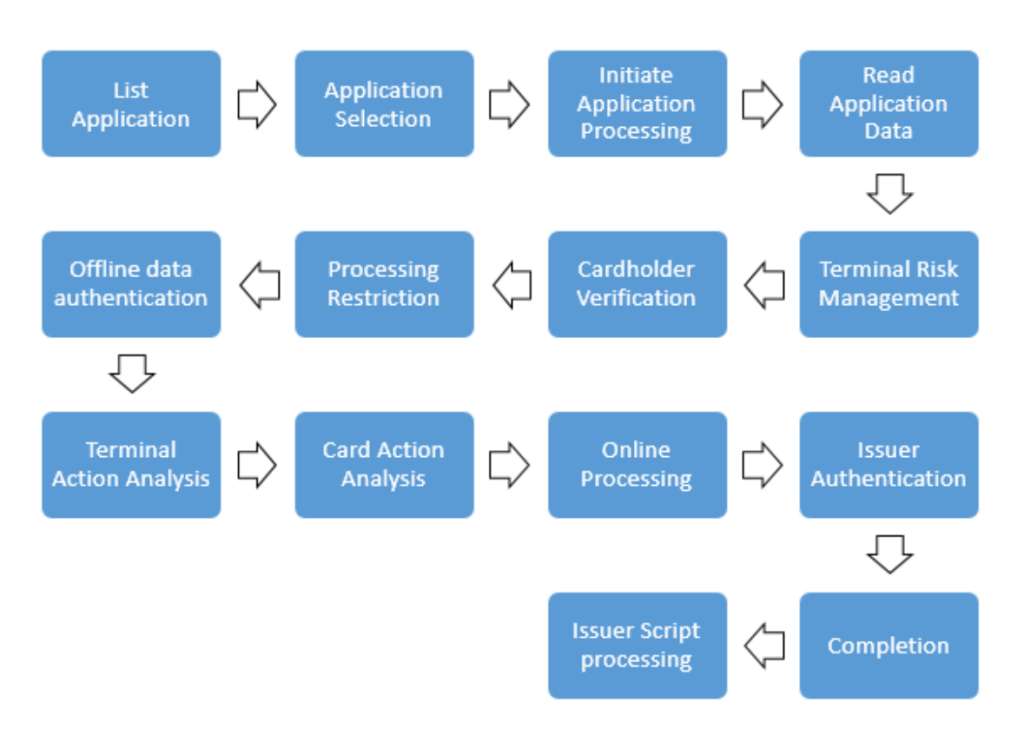
In EMV transactions, Application Selection is the process of selecting among the applications supported by both the card and the terminal. Because application selection is the first stage of authorization in EMV transactions, it is very important.
Application Selection:
Application Selection is the process of selecting among the applications supported by both the card and the terminal.
· If the terminal does not support any card application, the transaction is stopped
· The terminal checks which applications are present on the card.
· If the terminal supports only 1 of the card applications, the transaction is performed with that application.
· If the terminal supports more than one of the card's applications:
- The terminal displays the supported applications, and the cardholder selects one of the displayed applications to perform the transaction.
- The terminal selects the application with the highest priority to perform the transaction.
· The terminal can use 2 methods to build the Candidate List:
- PSE Method (PSE = Payment System Environment)
- If it is supported by the terminal and PSE data exists on the card
- The terminal tries the PSE method first; if the attempt fails, the terminal retrieves the AID (Application Identifier) list.
- The PSE on the card contains information about which applications are present on the card
- To find out which applications are present on the card, the terminal reads all the records in the card's PSE
- List of AIDs method (AID = Application Identifier)
- The terminal must always support this method.
- The terminal holds a list of the applications it supports.
- The terminal tries to select all the listed applications.
- The card indicates whether the applications are present.
PSE Method :
- The chip PSE File Identifier has the value ‘1PAY.SYS.DDF01’ (in hexadecimal: ‘315041592E5359532E4444463031’).
- The terminal sends a SELECT command with the PSE File Identifier.

o The card responds to the SELECT command.

- If the PSE is not present on the card, the card returns Status Word ‘6A82’ and returns no data.
- If the PSE is present on the card, the card returns Status Word ‘9000’, and the data in the response is in TLV format (Tag-Length-Value) and contains the following information.
- This response includes the Tag 84 (Definition File) record. Within Tag 84, there can be multiple Tag 88 SFI (Short File Indicator) entries that provide information about the application.

- If the card does not respond successfully to the SELECT PSE command (Status word 6A82):
- The terminal switches to the AID method
- If the card responded successfully to the SELECT PSE command (Status Word 9000):
- The terminal sends the READ RECORD command for the first record in the file identified by the SFI (Tag 88) in the card's SELECT PSE response:
- The terminal retrieves the AID method list.

- The card responds to the READ RECORD command:

Ø If there is no record data, the card returns Status Word ‘6A83’ and returns no data
Ø If there is record data, the card returns Status Word ‘9000’ and the following data is sent in TLV format within the response data:

§ The terminal checks the Application Identifier (Tag 4F) value in the card's READ RECORD response and determines whether the application concerned is supported by the terminal.
Ø The terminal adds the application concerned to its Candidate List.
§ The terminal keeps sending READ RECORD commands for the subsequent records (Next SFI Tag 88 in Tag 84 Definition file) until the card responds with Status Word ‘6A83’ (Record not found).
§ PSE Method in commands:
Ø SELECT PSE
Ø READ RECORD 1 of PSE(Response 9000)
Ø READ RECORD 2 of PSE(Response 9000)
Ø …………
Ø READ RECORD n of PSE(Response 9000)
Ø READ RECORD n+1 of PSE((Response 6A83)
List of AIDs method:
- For each application in its application list, the terminal sends a SELECT command with the AID.

· The card responds to the SELECT command:

o If the application is not present on the card, the card responds with Status Word ‘6A82’ and no data.
o If the application is present on the card, the card responds with Status Word ‘9000’, and the response data is in TLV format (Tag-Length-Value) and contains the following information:

o If the card responds successfully to the SELECT command:
Ø The terminal adds the application concerned to the Candidate List
o The terminal sends the SELECT command for the next application in its own application list (ApplicationList).
Ø List of AIDs method in commands
Ø SELECT AID 1 of Terminal's AID List
Ø …
Ø SELECT AID n of Terminal's AID List
- Final selection:
- When the terminal has built the Candidate List (using the PSE Method or the List Of AIDs Method)
- If there are no mutually supported applications:
- When the terminal has built the Candidate List (using the PSE Method or the List Of AIDs Method)
Ø The terminal terminates the transaction.
- If there is only 1 mutually supported application;
Ø The terminal sends a SELECT command for the supported application.
- If there is more than 1 mutually supported application;
Ø The terminal displays the supported applications; the cardholder selects 1 of the listed applications to start the transaction:
Ø The terminal selects the application with the highest priority to perform the transaction.
Ø The terminal sends a SELECT command to the selected application.
- The transaction continues with the finally selected application.