Contains the EMV steps performed by the Terminal in a transaction.
The TSI fields, their possible values, and descriptions of the values are shown below:
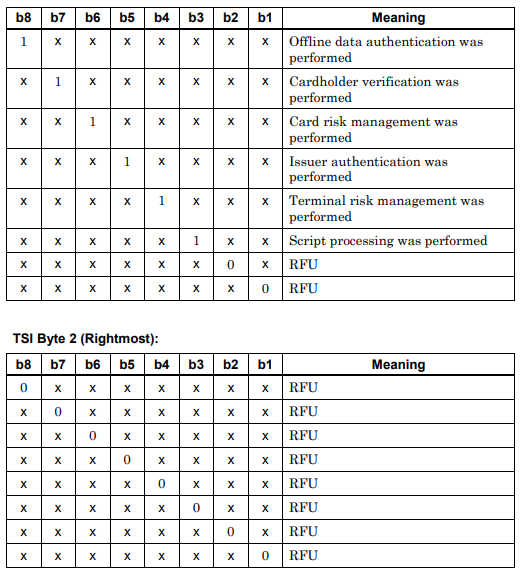
The structure of TSI
TSI is a 2-byte piece of data and is carried under tag 9B in EMV. All its bits are 0 at the start of the transaction. When the terminal performs an EMV step, it sets the bit corresponding to that step to 1.
Which steps does TSI indicate?
- Whether offline data authentication was performed
- Whether cardholder verification was performed
- Whether card risk management was performed
- Whether issuer authentication was performed
- Whether terminal risk management was performed
- Whether issuer script processing was performed
The difference between TSI and TVR
TSI and TVR are often confused. TSI shows which steps were performed. TVR shows whether a problem was encountered during these steps. For example, if the offline data authentication bit in TSI is 1, this step was performed. Whether the authentication was successful is understood from the corresponding bits in TVR.
Use in error analysis
When examining why a transaction was declined, TSI and TVR are evaluated together. Since TSI shows which steps the terminal skipped, it is useful for detecting errors in terminal software or parameters.