The Pin Change/Unblock command is used after card issuance to allow the issuer (the organization that issues the card) to remove the PIN block, or to instantly change the reference PIN and remove its block.
After the PIN CHANGE / UNBLOCK command completes successfully, the card performs the following functions:
- The PIN Try Counter value is reset to the PIN Try Limit value.
- If requested, the reference PIN's value is set as the new PIN value.
The components of the Pin Change/Unblock command are shown below:
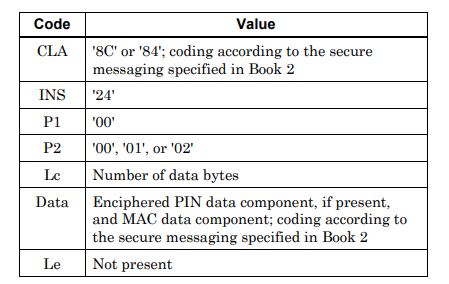
You can find the PIN Block value generated by entering the PIN information and PIN Block Format at the link below.
https://paymentcardtools.com/pin-block-calculator
Two different uses
This command can be used for two different purposes:
- PIN Unblock: Only the PIN try counter is reset. The cardholder's PIN does not change.
- PIN Change: The PIN try counter is reset and the PIN on the card is changed to a new value.
Which operation is performed is determined by the command's parameters.
Offline PIN change
On cards that use offline PIN, the PIN is also stored inside the chip. When the cardholder changes their PIN, the new PIN must be updated both in the bank's system and on the card's chip. The bank performs this update using the PIN Change command during the card's next online transaction. For this reason, some banks recommend that after a PIN change, the card first be used in an online transaction, for example at an ATM.
Security
The new PIN is not sent to the card in cleartext. The PIN is sent as a PIN block encrypted with the card's key, and the command is protected by a MAC. The card does not execute the command until the MAC is verified and the encrypted PIN is decrypted.
From the cardholder's perspective
When a PIN block occurs, the cardholder can remove the PIN block through their bank's ATM or mobile app. In the background, this operation most often uses this very command.