In payment or cash withdrawal transactions, the function that generates the TR QR Code resides on the POS or ATM.
The duty of the card issuing bank (issuer) is to build its system so that it can read the code in TR QR Code format generated by the POS or ATM and take action on it.
Two different QR code formats are used in payments with the TR QR Code.
- Short QR Code
- Long QR Code
The QR code is read by the mobile application/wallet provided by the card issuing institution.
When the application reads the QR code, it must decide whether it is a long QR or a short QR (usually the backend systems make this decision and pass it to the application) and call the BKM services accordingly.
In the short QR process, compared with the long QR, the issuer must first obtain confirmation from BKM for the QR validation step, and then run the payment flow with the QR.
Errors in integrations are usually caused by these steps not being run correctly.
Below, I am sharing BKM's payment flows for the long QR code and the short QR code:
Link to the document:
5.1.1 Payment Flow Initiated by Generating a BKM Long QR Code Format at the POS
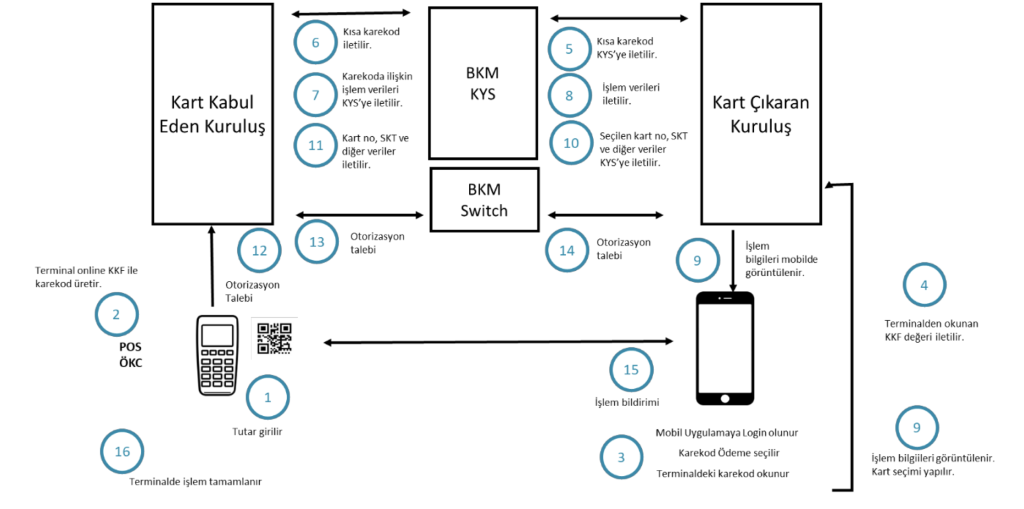
Figure 1 shows the card payment workflow for the use of the BKM Long QR Code Format (UKF) presented by the merchant.
Figure 1: Payment Flow Initiated by Scanning the BKM UKF with the Card Issuer's Mobile Application
Flow steps where the transaction amount is determined by the merchant:
- The transaction amount is set on the terminal and the QR code generation process is started.
- The terminal generates the QR code containing the payment details in accordance with the BKM UKF structure.
- The cardholder scans the QR code displayed on the terminal through their mobile application. The transaction amount and merchant name in the transaction data taken from the QR code are displayed in the application.
- The cardholder selects the card they will use for the transaction in the mobile application.
BKM (Card Payments) TR QR Code Technical Principles and Rules Guide 1.1.
- The card number of the card selected by the cardholder, the expiry date, the cardholder verification method (CVM type), the e-commerce indicator (ECI value) and the QR code value read from the POS terminal are sent by the card issuer to the QR Code Routing System (KYS). This data is encrypted with the AES key shared between the card issuer and the KYS.
- The KYS encrypts the incoming card information and the data in the QR code value under the acquirer's AES key and forwards it to the acquirer.
- The terminal creates an authorization message with the incoming data and routes the transaction to the acquirer's system. If the issuer has requested PIN as the cardholder verification method (CVM) type, the terminal asks the cardholder for the PIN and adds the PIN block data to the authorization message.
- Based on the request coming from the terminal, the acquirer sends the transaction to the BKM Routing System.
- The BKM Routing System routes the transaction to the issuer.
- In addition to returning the authorization response, the issuer also sends the approval or decline information as a notification to the mobile application that initiated the QR code transaction.
- In line with the authorization response coming through BKM, the terminal completes the transaction.
5.1.2 Payment Flow Initiated by Generating a BKM Short QR Code Format at the POS
Figure 2 shows the card payment workflow for the use of the BKM Short QR Code Format (KKF) presented by the merchant.
Figure 2: Payment Flow Initiated by Scanning the BKM KKF with the Card Issuer's Mobile Application
Flow steps where the transaction amount is determined by the merchant:
- The transaction amount is set on the terminal and the QR code generation process is started.
- The terminal generates the QR code containing the payment details in accordance with the BKM KKF structure.
- The cardholder scans the KKF QR code generated on the terminal through their mobile application.
- The short QR code value read by the mobile application is sent to the card issuer's system.
- The issuer sends the KKF value to the KYS.
- The KYS routes the incoming QR code content to the acquirer.
- The acquirer returns the transaction data related to the KKF QR code to the KYS.
- The KYS routes the QR code information coming from the acquirer to the issuer.
BKM (Card Payments) TR QR Code Technical Principles and Rules Guide 1.1.
- The issuer displays the transaction information in its mobile application. The cardholder selects the card they will use for the transaction.
- The card selected by the cardholder, the expiry date, the cardholder verification method (CVM type), the e-commerce indicator (ECI) and the QR code value read from the terminal are sent by the issuer to the KYS. This data is encrypted with the AES key shared between the issuer and the KYS.
- The KYS forwards the incoming card and QR code value data to the acquirer, encrypting it under the acquirer's AES key.
- The terminal creates an authorization message with the incoming data and routes it to the acquirer's system. If the issuer has requested PIN as the cardholder verification method (CVM type), the terminal asks the cardholder for the PIN and adds the PIN block data to the authorization message.
- The acquirer routes the transaction to the BKM Routing System.
- The BKM Routing System routes the transaction to the issuer.
- The issuer sends the approval or decline information as a notification to the mobile application that initiated the QR code transaction.
- In line with the authorization response coming through BKM, the transaction is completed on the terminal.