Skip to content

Search

"Terminal"

252 articles found

Merchant choosing between a bank POS and a virtual POS service

Merchant & POS

Is it mandatory to work with a bank to get a POS terminal?

The answer depends on the type of POS terminal. A physical POS (GPRS, Dial-Up, IP, or cash-register POS) requires working with a bank. A virtual POS can also be obtained from a payment institution without a separate bank agreement.
POS terminal software version update process diagram

Merchant & POS

How is a software version uploaded to a POS terminal?

To upload a version to a POS, the software on the POS and the authorization system on the bank side must support it. Version upload to a POS can be done manually on the device itself, or via a remote upload request.

Illustration of a smartphone used as a mobile POS payment terminal

Merchant & POS

Are POS Terminals Becoming Obsolete?

Today, as credit cards shift from physical to virtual use, a similar move has come from the POS side. We have begun to see mobile phones used as POS devices becoming a serious rival to physical POS terminals.

Diagram of the EMV application selection flow between the terminal and the card

Merchant & POS

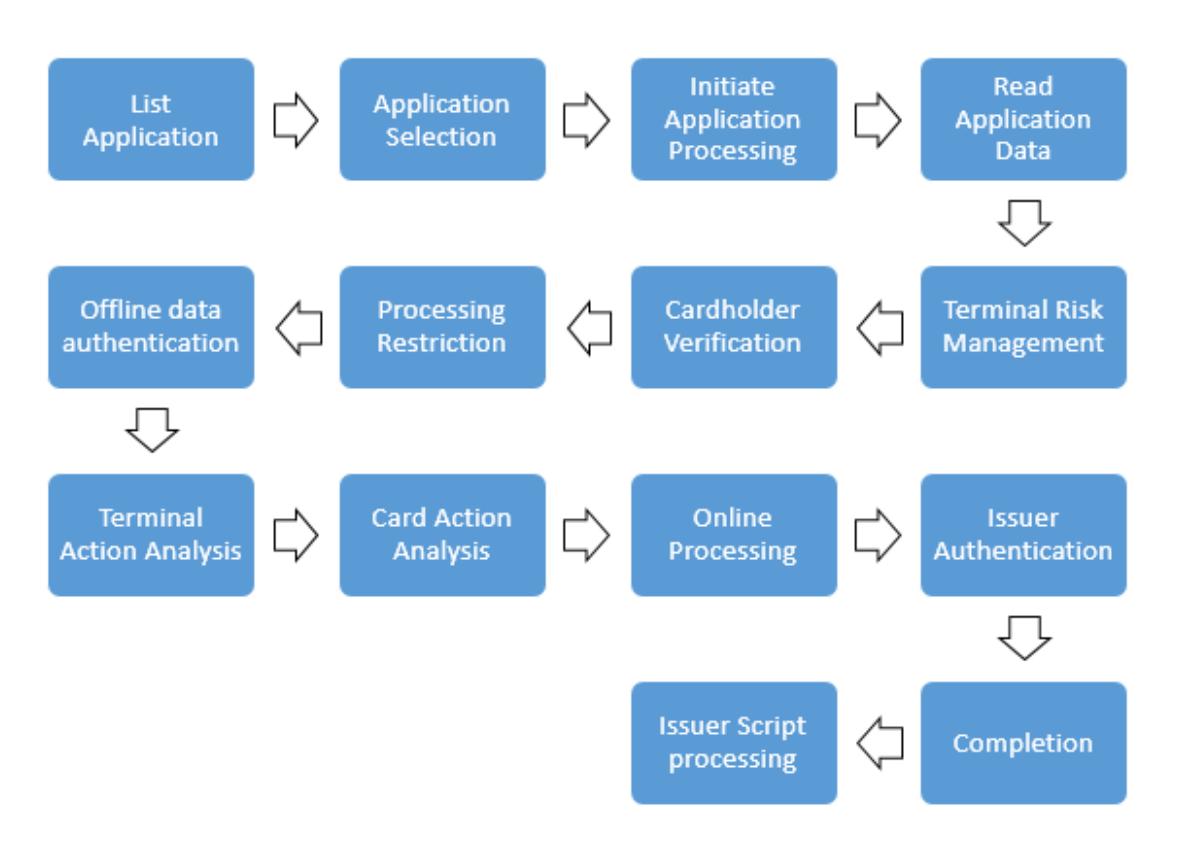
EMV Chip Transaction Processing - What Is Application Selection?

In EMV transactions, Application Selection is the process of choosing among the applications supported by both the card and the terminal. It is the first stage of authorization, so it is very important. This post covers the PSE and List of AIDs methods.

Diagram illustrating the Store and Forward (SAF) offline transaction process

Payment Systems

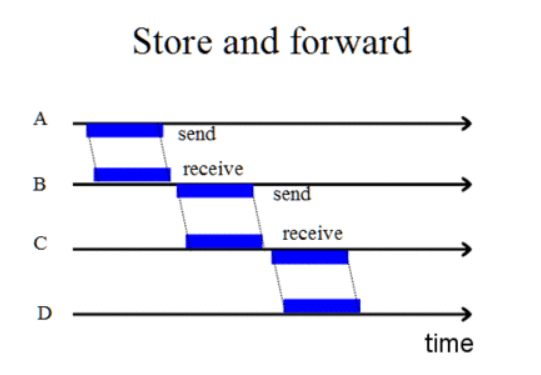
What is Store and Forward (SAF)?

Store and Forward (SAF) describes offline transaction processing. It was originally developed when modems were introduced and connections were not always stable, letting terminals store transactions and forward them once connectivity is restored.

Diagram illustrating the ISO 8583 F55 field structure for ICC system related data

ISO 8583

ISO 8583 Field Descriptions (F55)

F55 - INTEGRATED CIRCUIT CARD (ICC) SYSTEM RELATED DATA: the field where EMV data is written on chip cards. It consists of components such as Position, Private Data Subelements, PDS Tag, PDS Length, and PDS Value...

Diagram illustrating the structure of an ISO 8583 message field

ISO 8583

ISO 8583 Field Descriptions (F41)

F41 - CARD ACCEPTOR TERMINAL IDENTIFICATION: the terminal where a transaction took place. An 8-character alphanumeric value generated by the acquirer bank and assigned to the POS, managed as a unique terminal number at the acquirer.

Diagram of the TR QR Code payment flow between cardholder, issuer, BKM and acquirer

Payment Systems

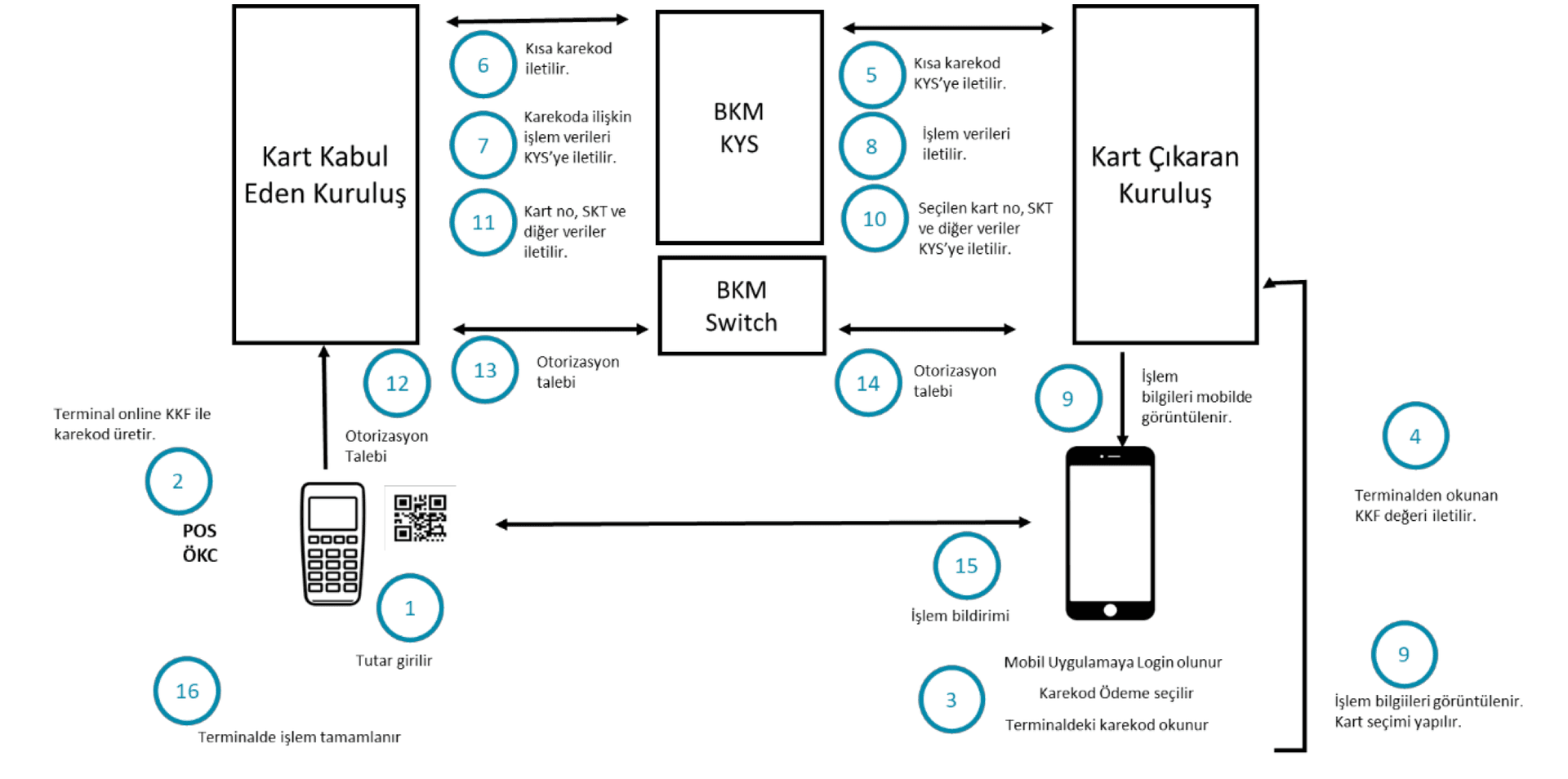
Why Am I Getting an Error When I Try to Pay with a TR QR Code?

In payment or cash withdrawal transactions, the TR QR Code is generated by the POS or ATM. The card issuing bank must build its systems to read and act on this code. Errors usually stem from mishandling the long and short QR code flows, which are explained here.

Diagram illustrating ISO 8583 Field 61 Point of Service (POS) data structure

ISO 8583

ISO 8583 Field Descriptions (F61)

F61 - POINT OF SERVICE (POS) DATA: This field provides information about the specific status of the POS at the time of the transaction. Position Usage Attribute 1 POS Terminal Attendance Indicator 0 = Attended terminal (Valid for MasterCard debit card and Maestro transactions only).

EMV Application Version Number on card and terminal

Online & Authorization

Application Version Number

The Application Version Number is the version number of the application on the card. For example, the Visa VSDC application version number is 131, and the Mastercard M/Chip Lite version number is 2.